
 Welcome to the Faculty of Arts at the University of Pécs! A new city, a new environment, and countless opportunities await you—it’s easy to get lost in all the information during your first few weeks, so we’ve gathered the most important information for you in one place.
If you're just getting to know the city, click the first button; if you're looking for answers to questions about school, college, or community life, scroll down (topics are listed alphabetically within each section, and you can also search for keywords on the page using the Ctrl + F shortcut).
Just landed in Pécs - Tips for newcomers
IMPORTANT! The information below is intended to help you get started and navigate the administrative process; the content may be subject to change, so please always carefully review the specific regulations and policies that apply to you.
Residence permit
International students may need to complete certain immigration procedures during their stay in Hungary. The University of Pécs provides information on residence permits, immigration procedures, and the location of the Immigration Office in Pécs. For detailed information, please visit the following pages:
- Immigration Affairs – general information on immigration procedures and requirements
https://international.pte.hu/admission/prepare-your-stay/immigration-affairs - Where can I find the Immigration Office? – information about the Immigration Office in Pécs
https://international.pte.hu/faq/where-can-i-find-immigration-office-0 - Residence Permit – information about applying for and maintaining a residence permit for study purposes
https://international.pte.hu/current-students/upon-arrival/residence-permit
Microsoft Office 365 installation and use
Students with active status at the University of Pécs automatically receive access to Microsoft Office 365. The IT Directorate provides full support for the use of M365 office applications. For student M365 access, the account is created within 12 hours of student status activation in the Neptun system.
Details and further information: https://art.pte.hu/en/microsoft-office-365-installation-and-usage
What can you find where, and whom can you contact?
Neptun
Neptun is the academic administration system used in higher education, through which students manage their university-related affairs. It allows you to, among other things, register for courses, sign up for exams, check your timetable, view your grades, and handle payments and official administrative tasks.
Neptun is particularly important because a significant portion of the university's official communication is sent through it. Messages and notifications within the system may contain deadlines, academic information, and details regarding scholarships, exams, or administrative matters. It is therefore advisable to check Neptun regularly and read the messages you receive there so you do not miss out on important information. You can access the detailed user guide here: Neptun User Guide.
REGISTRAR’S OFFICE
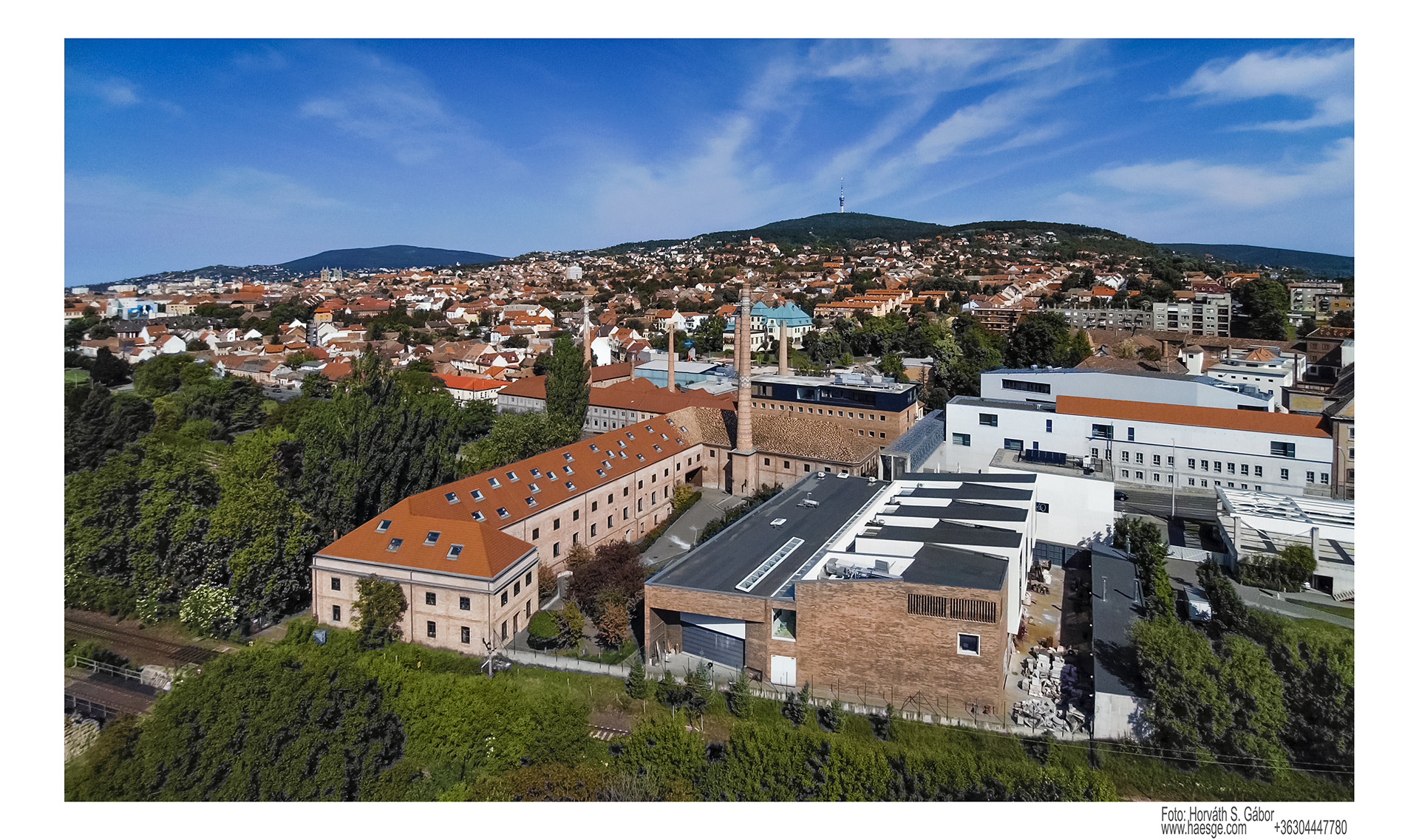
Each faculty has its own academic affairs office; the one for the Faculty of Arts is located in the Zsolnay Quarter, on the first floor of Building E33 (room 106). They provide assistance with the following:
- enrollment
- student ID card administration
- processing of formal requests
- administration of exam periods and course registration
- scheduling of final exams
- administration of thesis submission
- obtaining digital or printed curriculum
- discussing academic progress
- issuance of official certificates
- termination of studies
- transferring to another major
- transferring to another university
STUDENT UNION: HÖK AND EHÖK
Faculty HÖK (Student Union / Student Council): Represents students of your specific faculty (Faculty of Arts) in dealings with the faculty leadership (instructors, Dean). They provide direct, local assistance. You can turn to them for matters regarding faculty-specific advocacy, legal representation, event organization, and local support.
EHÖK (University Student Union / University Student Council): Represents students from the entire university (University of Pécs) at the highest levels (e.g., the Senate). It coordinates the various faculties and handles central matters affecting all students. This is where university-level issues are managed, including advocacy, legal representation, event organization, support services, and the Central Grant and Service Office.
A rule of thumb for students:
If your problem concerns a specific course, an instructor, or faculty regulations, contact the Faculty Student Union.
If you are seeking social support, a dormitory place, or are submitting a university-level grant application, contact the University Student Union.
Scholarship Counseling
The Grant and Equal Opportunities Committee of the University Student Union holds weekly consultation hours at our office, where you can get help filling out the social status assessment form required for social scholarships and dormitory applications. As the consultation may take some time, it is recommended to book an appointment in advance!
PTE Student Service School Cooperative
If you are looking for student work, the PTE Student Service School Cooperative offers a local solution. The School Cooperative holds weekly consultation hours at our office. The EHÖK KPSZI (University of Pécs Central Grant and Service Office) office is located behind the Rector's Office building (Pécs, 48 Square), you can access it from the courtyard.
IN CASE OF PROBLEMS
If you encounter infrastructure-related issues (e.g., the classroom is in poor condition, equipment is missing, or there are problems with heating or accessibility), you can report these to the institute manager, the head of the institute, or the faculty director. They are also the appropriate contacts if classes are not being held consistently. Reports can be made either by name or—depending on the situation—anonymously, either verbally or via email.
If you have special needs and/or a disability, you may require special academic consideration, the Registrar’s Office can assist you in this regard. In such cases, you must submit the request titled "PTE – General request regarding other academic matters" via the Neptun system, ensuring that the relevant expert opinion is attached. In the request, describe which types of exams or assessments pose a difficulty for you in their standard format and specify the accommodations you require:
- A preference for written or oral exams for specific subjects
- Extended preparation time
- Extended time to complete written exams
- Leniency regarding spelling/orthography
- Use of assistive devices during the exam
- Authorization for an individual exam arrangement
- Other accommodations justified by the expert opinion
The Registrar’s Office / Student Administration Office is responsible for academic matters. In the following cases, you must submit the request titled "PTE – General request for other academic matters" via the Neptun system; the Registrar’s Office will then review the case and take the necessary measures or conduct the procedure in accordance with the relevant regulations. This procedure applies to the following issues:
- Academic disputes involving an instructor, such as those concerning requirements, examinations, or differential treatment (discrimination or unjustified preferential treatment)
- Conflicts with a thesis supervisor or a major subject instructor
- Complaints regarding assessment or grading In certain cases, you have the right to appeal a decision.
The Registrar’s Office can provide detailed information regarding the conditions, method, and deadlines for appeals, therefore, it is advisable to contact them directly in such instances.
If you experience harassment, verbal abuse, or discrimination—whether from an instructor or a fellow student—you may turn to the Student Union (HÖK) for assistance. If you wish to report an issue anonymously, the Student Union can help you maintain your anonymity during any potential proceedings.
GUIDES (Neptun, phone replacement)
NEPTUN
After five failed login attempts, the Neptun system blocks access for 6 hours. This count includes not only attempts to log into the Neptun academic system itself but also attempts to access any platform requiring your Neptun code and password (e.g., Moodle, Teams, Wi-Fi).
Students with active student status can use the eduroam Wi-Fi network. To connect, use your Neptun code in the format „neptuncode@tr.pte.hu” along with your Neptun password.
On the University of Pécs Password Management interface, you can request authentication for password changes or account unlocking via the phone number or email address registered in Neptun.
The Neptun guides page offers various resources for students, providing detailed descriptions and screenshots to assist with using specific Neptun functions.
- Here is the guide for semester activation and setting a semester to inactive status: semester activation/inactivation.
- The guide regarding the process of registering for subjects and courses: subject and course registration.
- Information on exam registration, cancellation, and rescheduling: exam registration, cancellation, and rescheduling.
- And the guide for enabling two-step verification: two-step verification.
If you encounter an error message while using a Neptun function, please take a screenshot and email it—along with a description of the problem—to our colleague Péter Móritz (moritz.peter@pte.hu).
CHANGING YOUR PHONE
If you plan to switch devices, it is advisable to temporarily disable two-step verification under the "Profile Settings" / "Password Settings" menu before making the switch. Delete the account linked to Neptun from the app installed on your old device. Then, set up a new account on your new device following the instructions described above.
If you did not take the steps above, no longer have access to your old device, or encounter issues while deleting the registration, please contact Péter Móritz, the faculty Neptun key user (moritz.peter@pte.hu). The faculty key user will temporarily disable two-step verification, allowing you to set it up again on your new device.
MFA
The acronym MFA stands for Multi-Factor Authentication. It is a security measure that employs a multi-step authentication process. For example, when using a website or service, MFA requires the user to provide not only a password but also a secondary authentication factor, such as a code received via SMS or a unique code generated by an app.
MFA enhances online security by protecting the account even if the password has been compromised by unauthorized individuals.
Systems using MFA: Microsoft 365 (e.g., Outlook email, Teams, SharePoint, OneDrive, Excel, Word).
Setup guide: MFA setup guide.
HEALTH INSURANCE
HEALTH INSURANCE
International students must have appropriate health insurance coverage during their stay in Hungary. For information about the available health insurance options, including the European Health Insurance Card (EHIC), private health insurance, and the Hungarian TAJ card, please visit the page below: https://international.pte.hu/admission/prepare-your-stay/health-insurance
TAJ CARD
The TAJ card is essential for accessing healthcare services in Hungary. For detailed information about the application process, required documents, renewal, and replacement, please visit the page below: https://kti.pte.hu/en/kti/egyeb/taj-card-administration-procedure-university-pecs
MEDICAL CARE
If you need medical care during your stay in Hungary, the page below provides useful information about healthcare services, emergency contacts, pharmacies, and the University GP: https://international.pte.hu/current-students/information-about-services/medical-care
STUDENT ID CARD
APPLYING FOR A STUDENT ID CARD
Applying for a PTE student ID card begins with obtaining a so-called NEK data sheet at a Government Document Office. The application process then continues in the Neptun system and concludes at the faculty’s Registrar’s Office.
Requesting the NEK data sheet, visit a Government Office (Kormányablak, nearest to the university: https://shorturl.at/cnSJR) to have your photo and signature recorded. You will receive a 16-digit NEK identification code, which is required to submit your application.
Application in Neptun: Log in to the Neptun Student Web interface, select the "Administration" > "Student ID card application" menu option, and submit a new application by entering the NEK identifier you received without the dashes (-). Checking status: You can continuously track the status of your application within the Neptun system.
Temporary Student ID Certificate request: Until the physical card arrives, you can request a certificate from your academic administrator to serve as a temporary student ID for accessing travel discounts.
STUDENT ID VALIDATION
Students with active student status receive a validation sticker. The validation sticker is valid until March 31 for the autumn semester and until October 31 for the spring semester. Student ID validation must be completed no later than the end of the study period.
LOST STUDENT ID CARD
If you lose your student ID card and it had a validation sticker on it for the current semester, a procedural fee of HUF 3,500 must be issued and paid in the Neptun system to cover the loss of the sticker, and concurrently submit a request for a new ID card. Additionally, you must submit a formal declaration regarding the loss of the card and/or validation sticker by completing the appropriate form and sending it to the Registrar’s Office.
FEES
University of Pécs cash desk opening hours: https://oig.pte.hu/en/kti/finances/opening-cash-desk
- Fee for retaking a course: 1,000 HUF per credit, this fee is charged to the student by the Central Registrar’s Office during the semester in which the course is retaken.
- Exam fee: If a student takes an exam for the same subject three or more times during their studies, they are required to pay a fee for the third and any subsequent exams - with the exception of grade - improvement exams. This fee is specified in Annex 1 of the Regulation on Fees and Benefits and is currently 3,500 HUF. Students issue the payment item themselves in Neptun under the "Finances" → " To be paid" menu by using the pop-up window that appears when clicking the "New item" button.
- Fee for registering for or dropping a course after the deadline: 5,000 HUF Students generate the payment item themselves in Neptun under the "Finances" → " To be paid" menu by using the pop-up window that appears when clicking the "New item" button.
- Fee for retaking a major subject: 10,000 HUF Students generate the payment item themselves in Neptun under the "Finances" → " To be paid" menu by using the pop-up window that appears when clicking the "New item" button.
In the pop-up window, select the following options:
- Title of payment: Service title
- Term: Current term
- Service type: Select the item from the list for which you want to create the payment fee
Then click Create and Pay. The fee will be created, and you can proceed with the payment.
ACADEMIC AFFAIRS
STUDY PROGRAMS AND CREDITS
The recommended curriculum provides a suggested study schedule for the duration of the program, indicating which courses are recommended to be taken in each semester. Following the recommended curriculum helps students plan and complete their studies within the prescribed timeframe, while ensuring that courses are taken in the appropriate sequence. This reduces the risk of delays in academic progress. Each course within the University's degree programs is assigned a specific number of credits. Students are recommended to complete 30 credits per semester on average. Depending on the program, the total number of credits required for graduation generally ranges from 120 or 180 or 300 credits. Completing credits continuously and at an appropriate pace is essential for satisfactory academic progress.
Course Types
- Compulsory courses: These courses are mandatory for all students enrolled in the program.
- Compulsory elective courses: Students are required to choose from a specified group of courses.
- Free elective courses: Students may choose any course they wish, including courses offered by other programs.
STUDY CONTRACT
If you have been admitted to the Faculty of Arts as a self-financed student, you are required to print, complete and sign two copies of your Student Study Contract after enrolment in Neptun. The contract can be found in Neptun under: Studies → Studies main menu → Registry record→ Official notes. Once completed and signed, both copies must be submitted to the Faculty’s Registrar’s Office.
CERTIFICATES
The Faculty issues the following official documents upon request: Certificate of Student Status; Credit Certificate; Certificate of Completion of Coursework (Absolutorium); miscellaneous certificates and transcripts relating to academic records.
You may request a student status certificate with digital signature through the Neptun system, which you can download it directly from the interface. To access the document, click the arrow next to your name in the upper-right corner of the screen to open the menu, then navigate to Document Storage, where the requested certificate can be found in the "Latest" or "TR Documents" folders.
TERMINATION OF STUDENT STATUS UPON THE STUDENT'S REQUEST
Students may request the termination of their student status by submitting an application through the Neptun system. In Neptun, navigate to: Menu → Administration → Requests and complete the request titled "PTE Termination of Student Status on the student's own announcement" Once the request has been approved, the document generated by the system must be printed, signed, and submitted to the Faculty’s Registrar’s Office. The student's status will be terminated upon receipt of the duly completed and signed document.
SUSPENSION OF STUDIES (PASSIVE SEMESTER)
As a general rule, students are not permitted to suspend their studies during their first semester. However, if exceptional personal circumstances (e.g. childbirth, an accident, or other serious life events) prevent the commencement of studies, permission to suspend the semester may be granted on the basis of exceptional consideration. In such cases, students must submit a written request addressed to the Dean, explaining the circumstances that prevent them from commencing their studies. The request must be submitted to the Faculty’s Registrar’s Office.
In subsequent semesters, students may register for no more than two consecutive passive semesters in the Neptun system. Although it is technically possible to select passive status in Neptun beyond this limit, any additional passive semester requires the submission of a separate request and is subject to approval.
EXAM PERIOD
Students are entitled to three examination attempts for a course during a single examination period, and a maximum of six examination attempts per course throughout their entire period of study.
Students are therefore advised to plan their examination schedule carefully within the examination period, taking into account the published examination dates, to ensure that all three available examination opportunities can be used if necessary.
- Students must register for an examination no later than 24 hours before the scheduled examination time.
- Students may cancel their examination registration no later than 36 hours before the scheduled examination time.
Oral and Written Examinations
For both in-person and online oral examinations, the examiner must ensure that at least one additional student who is familiar with both the subject matter and the language of the examination is continuously present until the examination has concluded.
If a student fails the first retake oral examination, they are entitled, upon request, to take the second retake examination before another instructor or before an examination board appointed by the Head of Department.
The examiner is required to record the results of oral examinations in the Neptun system by 12:00 noon on the first working day following the examination.
For written examinations, the papers must be marked within three working days of the examination date, and the results must be recorded in Neptun by 3:00 p.m. on the third working day.
Online Examinations
Any intentional act causing a technical disruption during an online examination shall be considered academic misconduct (examination fraud).
If the technical problem is not caused intentionally, the examiner and the student are jointly responsible for taking reasonable steps to resolve the issue. Students should take a screenshot of the error and send it to the examiner without delay.
If the technical issue cannot be resolved within a reasonable period of time, the examination will be rescheduled. In such cases, an examination interrupted due to technical difficulties shall not be regarded as an examination attempt and will not count towards the student's maximum number of examination attempts.
Students may challenge the grade recorded in Neptun within 14 working days after the end of the examination period by submitting their objection to the course coordinator or the Head of Department.
Students must be given the opportunity to review their marked examination papers until the end of the examination period. If the total score has been calculated incorrectly or points have not been awarded for one or more answers, the student may submit a complaint to the examiner no later than the last day of the examination period.
If a student believes that the examination procedure violated the Code of Studies and Examinations, they may appeal to the Second-Level Academic Appeals Committee within 15 days, in accordance with Section 12 § (2) of the Regulations.
Retaking a course is subject to a fee of HUF 1,000 per credit. The fee is imposed by the Central Registrar's Office during the semester in which the course is retaken. This is independent from the fee incurred by retaking the examination for a second and subsequent occasions.
Examination Course
If a student has previously registered for a course at least once during their current program of study, but did not complete it, they may subsequently register for it as an Examination course.
FOR GRADUATING STUDENTS
Final Examination Registration Fee: Students who have already obtained absolutorium (completed all program requirements except the final examination) in a previous semester, are required to pay a HUF 20,000 Final Examination Registration Fee. Students with active student status on the program in the closing exam’s semester are not required to pay this fee. The fee must be generated by the student in Neptun under the "Finances" → " To be paid" menu by using the pop-up window that appears when clicking the "New item" button.
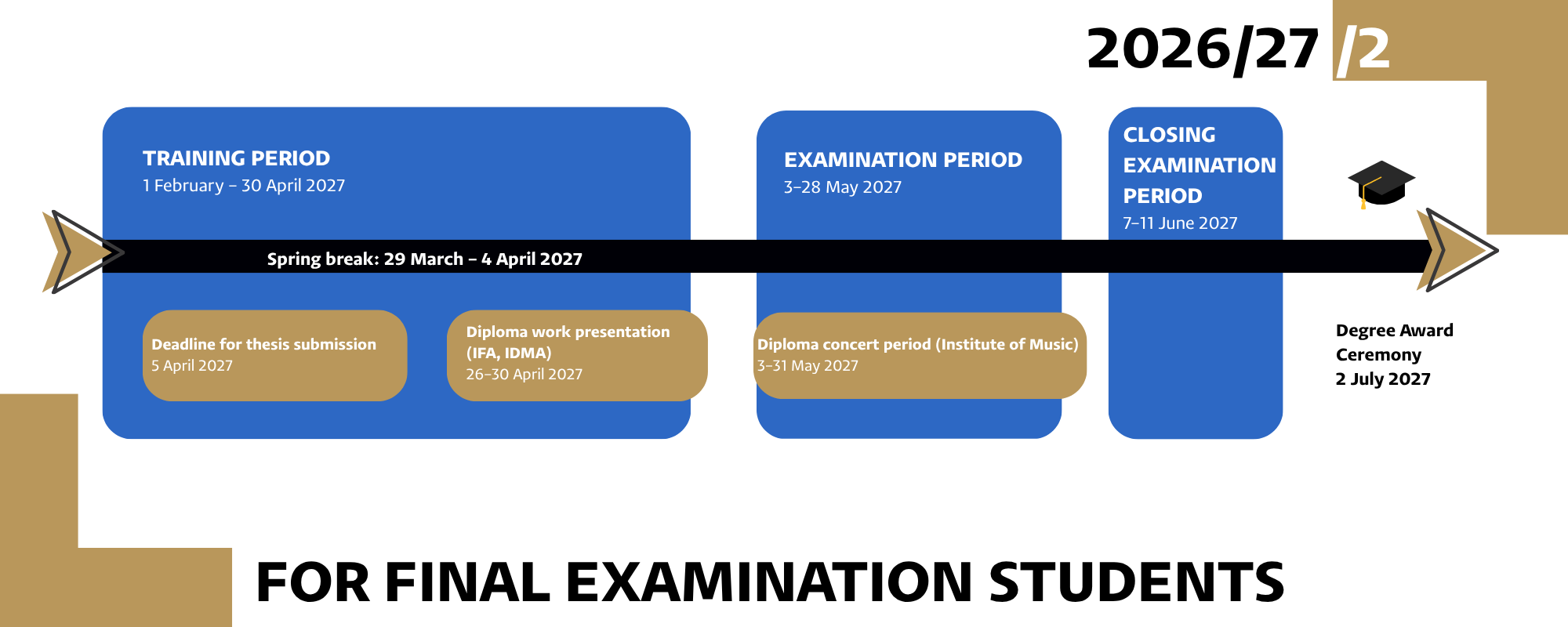
The final semester of your studies consists of several important milestones. The main stages are as follows:
- Teaching period: During this period, students complete the remaining courses required for graduation, attend classes, and fulfil all semester requirements.
- Thesis submission: The final version of the thesis must be uploaded to the Neptun system by the specified deadline.
- Diploma work presentation / Diploma concert: Students enrolled in the Institute of Fine Arts and the Institute the Design and Visual Arts are required to present their diploma project before their supervisor and the opponent. Students in the classical music and electronic music programs complete their studies with a graduation concert.
- Examination period: During the examination period, students complete the examinations and any remaining course requirements necessary to finish the semester.
- Final examination: Students may take the final examination only after submitting their thesis and successfully completing all required courses during the examination period. Following the successful completion of the final examination, the following administrative steps must be taken to have the diploma issued and collected:
- Returning borrowed books and sheet music to the University of Pécs (PTE) libraries and the Knowledge Centre (Tudásközpont).
- Returning borrowed musical instruments and accessories (e.g., mutes) to the administrator at the Institute of Music.
- Settling all outstanding financial debts recorded in the Neptun system.
- If you wish to attend the graduation ceremony, you must generate the payment request for the participation fee and pay it within the Neptun system.
- Graduation ceremony: Following the successful completion of the final examination, graduates receive their degree certificate at the official graduation ceremony.
Fall Semester, 2026–27 Academic Year

Spring Semester, 2026–27 Academic Year
CERTIFICATION PROCESS
If you plan to use your diploma abroad, you may need to have it legalized or obtain an Apostille certification, depending on the requirements of your destination country. Please note that the University of Pécs does not arrange the legalization of documents, so you will need to complete this process yourself.
At the award ceremony, in addition to your original diploma and Diploma Supplement, you will receive three certified copies that can be used during the certification process. If you would like to start the procedure before the graduation ceremony, please contact your administrator at the Registrar's Office.
You can find detailed information about the certification process, including the different types of legalization and the required steps, in the attached guide.
INSTITUTE OF FINE ARTS
Summer Art Workshop
Participation in Summer Art Workshop is mandatory in the number specified by the curriculum. Students will receive detailed information about the available Summer Art Workshop and the participation options from their Professors of Studio during the spring semester. The Summer Art Workshop take place during the summer period. The related course can be registered for in the Neptun system during the subsequent autumn semester, and the assessment is completed in December.
Professional Complex Exam
The Professional Complex Exam is one of the major academic milestones in the undivided master’s programs in Painting and Sculpture. According to the Code of Studies and Examinations, the Professional Complex Exam provides a comprehensive assessment of the professional knowledge and competencies acquired during the program. Please note that, in accordance with the Code of Studies and Examinations, failure to successfully complete the Professional Complex Exam results in the termination of the student's status. Detailed information on the examination requirements is available from the Heads of Program, Heads of Department, and the Faculty's academic information materials.
Major Subject
According to the Faculty specific Appendix of the Code of Studies and Examinations, a student's status shall be terminated on academic grounds if they register for the Major Subject specified in the curriculum on two occasions but fail to complete it on either occasion, provided that the student has previously been notified in writing, in accordance with the procedures set out in the Regulations, to fulfil this academic requirement and informed of the legal consequences of failing to do so.
Exhibition Opportunity at Nádor Gallery
Each autumn semester, typically around November, Nádor Gallery announces an open call for individual and group exhibitions for students pursuing higher education studies in the visual arts. Students of the Faculty may apply by submitting a brief description of the concept of their proposed exhibition or project. The call for applications is published on the Faculty's website, the Faculty's Facebook page, and the Nádor Gallery's Facebook page.